(try to imagine some mystery background music while reading the next lines. LOL) We've seen them everywhere scattered along the your files; One in each directory but what are they really? --- index.html.
Yeah, right. When I first started in Joomla then saw this index.html file I was like "what's the use of this one?" Even the novice tutorials on Joomla Docs included this file. I tried removing it and nothing happened so I don't include it anymore when I create an extension. Later on, while browsing the files on the browser I discovered the purpose of that tiny file index.html. So to all programmers, we know that index.html is the default file the browser loads if none of the other files was indicated. So the purpose of index.html is for security.
Security? Yeah, you heard me (or read it) right! This tiny (or zero file size) file does something for your files security. Okay, here's an example, I have a directory named "mytest" that contains two files namely file1.txt and file2.txt. If I locate the "mytest" directory on the browser it will show the files on that directory. Now, I'll add the index.html (empty file) on the "mytest" directory then located it once again on the browser. Can you guess what will display on the browser? If you're thinking that a white blank page will display then you're absolutely correct! You see, the browser searches for the index.html first when nothing on the files in the current directory was indicated. Getch?
Blogger's note: I think post is the most confusing one I created. I guess the current time in my place right now is also the factor on that. It's actually 4:28 AM here so still kind of sleepy. Anyways, any question, clarification, or correction are welcome just post it below on the comments section.
=D
Friday, May 25, 2012

Wednesday, May 23, 2012
[Ubuntu] Install PIL in Virtualenv
I look everywhere on how to install PIL without a hitch. After a few reading, searching, frustrations, installing and uninstalling, I finally found the one that works for me (and for you might as well).
Follow the steps on how to install PIL:
1 install the needed libraries
2 install the dependencies needed to build PIL
3 run these commands
4 Lastly, install PIL
You should at least see this somewhere
Follow the steps on how to install PIL:
1 install the needed libraries
sudo apt-get install libjpeg-dev libpng-dev zlib1g-dev liblcms1-dev python-dev
2 install the dependencies needed to build PIL
sudo apt-get build-dep python-imaging
3 run these commands
sudo ln -s /usr/lib/i386-linux-gnu/libfreetype.so /usr/lib/
sudo ln -s /usr/lib/i386-linux-gnu/libz.so /usr/lib/
sudo ln -s /usr/lib/i386-linux-gnu/libjpeg.so /usr/lib/
4 Lastly, install PIL
pip install PIL
You should at least see this somewhere
    --- JPEG support available
    --- ZLIB (PNG/ZIP) support available
    --- FREETYPE2 support available
Tuesday, May 22, 2012
[Joomla 2.5] Create New Article Frontend
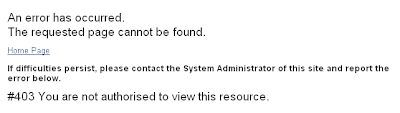
I have three Joomla 2.5 sites. One on my local and two on a free hosting site. On one of the two sites (on free hosting site), I create a menu item that allows frontend registered users to create an article but was given this error:
Subscribe to:
Posts (Atom)
